
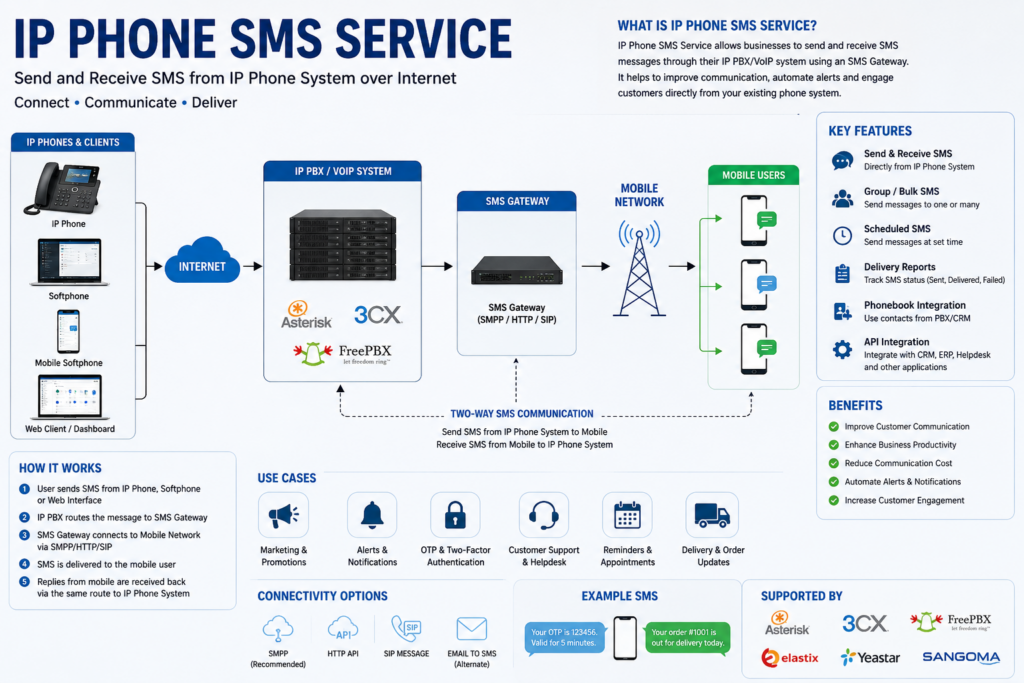
Introduction: The Way Business Communicates Has Changed Forever
Think back to ten years ago. If a customer wanted to reach your business, they called. If they couldn’t get through, they left a voicemail. If the voicemail went unanswered, they sent an email. And then they waited. Sometimes for hours. Sometimes for days.
That world is gone.
Today’s customers are accustomed to instant responses. They live on their smartphones. They book restaurant tables via WhatsApp, confirm doctor’s appointments through text messages, and expect their favourite brands to reply within minutes — not hours. The businesses that understand this shift are winning more customers, keeping them longer, and building stronger relationships. The businesses that don’t are slowly losing ground, one missed text at a time.
At Nextfone, we’ve always believed that great communication is the backbone of every great business. It’s why we’ve spent years building one of the most reliable, feature-rich IP phone platforms in the market. And it’s why today, we’re excited to go deep on one of our most talked-about features: the Nextfone IP Phone SMS Service.
This isn’t just a feature announcement. This is a complete guide — everything you need to know about what IP Phone SMS is, why it matters, how it works, who it’s built for, and how your business can start using it today to communicate faster, smarter, and more professionally than ever before.
Grab a coffee. Let’s get into it.
Part One: Understanding IP Phone SMS — What It Is and Where It Came From
The Evolution of Business Messaging
To understand what IP Phone SMS is, it helps to understand where business communication has been — and where it’s heading.
For decades, the telephone was the undisputed king of business communication. Companies invested heavily in PBX systems, phone lines, and call centres. The phone number was a business’s primary identity — it appeared on business cards, billboards, and storefronts. If a customer wanted to reach you, they dialled your number.
Then came email. Then instant messaging. Then social media. Each new channel promised to revolutionise communication, and each one did — but none of them killed the phone number. The phone number remained central. What changed was what customers expected that number to be capable of.
Customers started texting. First with each other. Then with friends and family. Then, slowly, with businesses. And once they discovered how convenient it was to text a business — to ask a quick question, confirm an appointment, or get a status update without sitting on hold — there was no going back.
By the early 2010s, it was clear: the businesses that could be reached by text had a significant competitive advantage. But there was a problem. Most business phone systems — traditional landlines, legacy PBX setups — couldn’t send or receive SMS. Business owners were forced to hand out personal mobile numbers, creating a messy, unprofessional experience that blurred the line between work and personal life.
Something had to change.
Enter VoIP and the IP Phone Revolution
VoIP — Voice over Internet Protocol — changed everything. By routing phone calls over the internet rather than traditional copper telephone lines, VoIP made it possible to attach new capabilities to phone numbers that were simply impossible before.
With VoIP, a phone number is no longer just a connection to a physical device on a wall. It’s a digital identity. It can be used on a desk phone, a laptop, a tablet, a smartphone app, or any internet-connected device. Calls can be routed, recorded, forwarded, and managed with software. And critically — SMS can be enabled on that number, turning your business phone number into a full two-way communication channel.
This is exactly what Nextfone IP Phone SMS is built on.
What Exactly Is IP Phone SMS?
IP Phone SMS is the ability to send and receive text messages using your business VoIP phone number — directly from your IP desk phone, your softphone application, or your Nextfone web dashboard.
It means your business number — the same number printed on your business cards, listed on your website, and already familiar to your customers — can now be texted. Customers can send you a message at any hour. You or your team can reply from a computer, a desk phone, or the Nextfone app on your mobile device. Every conversation is logged, searchable, and accessible to the right team members.
No separate mobile number. No personal phones mixed in with business. No missed messages hiding in someone’s personal inbox.
Just clean, professional, trackable business communication — through the number your customers already know.
Part Two: Why SMS Is No Longer Optional for Businesses
The Numbers Don’t Lie
Before we talk about how Nextfone SMS works, let’s talk about why your business absolutely cannot afford to ignore SMS as a communication channel.
The statistics around business SMS are frankly staggering:
- SMS open rates exceed 98%, compared to email’s average of around 20–25%.
- 90% of SMS messages are read within 3 minutes of being received.
- 75% of consumers say they prefer to receive offers, reminders, and updates via text over any other channel.
- Businesses that use SMS for customer communication report up to 40% higher customer satisfaction scores compared to those relying solely on voice and email.
- Click-through rates on SMS links are significantly higher than in email campaigns.
What do these numbers tell us? They tell us that SMS is not a trend. It’s not a gimmick. It’s the most reliably read, most promptly responded to, most universally preferred communication channel that exists today.
And yet, the vast majority of businesses still don’t offer it through their main business number. They rely on email for follow-ups, phone calls for support, and hope that customers are patient enough to wait.
That’s an enormous opportunity for the businesses willing to step up.
The Customer Experience Argument
Beyond raw statistics, there’s a deeper argument for business SMS: it makes the customer experience dramatically better.
Consider a simple scenario. A customer has a question about an order. Their choices are:
Option A: Call your business number, navigate an IVR menu, wait on hold for 8 minutes, explain their issue to an agent, and get a resolution.
Option B: Text your business number, get a reply within 2 minutes, issue resolved, back to their day.
Option B isn’t just more convenient. It’s so dramatically more convenient that customers who experience it become loyal. They tell their friends. They leave positive reviews. They come back.
This is what Nextfone SMS enables. Not just a new communication channel — a fundamentally better customer experience.
The Internal Efficiency Argument
It’s not just about customers. SMS also makes your team more efficient.
Voice calls are demanding. They require a team member’s full and undivided attention for their entire duration. You can’t handle two calls at once. You can’t quickly step away mid-call. Every call ties up an agent completely.
SMS is different. A skilled support agent can comfortably manage three, four, or even five text conversations simultaneously. Simple queries — order status, hours of operation, appointment confirmations — can be resolved in seconds without ever picking up the phone. This means your most experienced agents can spend their time on the complex, high-value interactions that actually require a conversation, while routine queries flow through SMS efficiently.
The result: lower call volume, shorter wait times, more resolved queries per hour, and a happier team.
Part Three: Nextfone IP Phone SMS — A Deep Dive Into the Features
Two-Way Messaging That Actually Works
At its core, Nextfone SMS is a genuine two-way messaging system. Your customers text you. You text them back. Conversations thread naturally, just like texting on a mobile phone — but with all the organisational and management tools a business needs.
Every conversation is displayed in a clean, intuitive inbox. You can see at a glance which conversations are active, which have been resolved, and which are waiting for a reply. Colour coding and status indicators make it easy for teams to triage incoming messages without anyone falling through the cracks.
One Number, Multiple Conversations
One of the most powerful aspects of Nextfone SMS is that it allows multiple team members to manage conversations from a single business number simultaneously.
In a traditional mobile texting setup, one phone number means one inbox, accessible to one person. If that person is busy, away from their desk, or out of office, messages pile up unanswered.
With Nextfone, your business number can have a shared inbox where multiple agents can see and respond to conversations. You can assign specific conversations to specific team members. You can set up notifications so that the right person is always alerted. And you have full visibility into who responded to what and when — invaluable for accountability and quality control.
Complete Message History and Searchable Logs
Every SMS conversation handled through Nextfone is automatically logged and stored. This isn’t just convenient — it’s essential for businesses operating in regulated industries, managing customer relationships, or training new team members.
Want to know what was discussed with a particular customer three months ago? Search their number or name and the full conversation history is right there. Need to pull all messages related to a specific order or case? Filter by date, keyword, or contact and get instant results.
These logs are also exportable, making them useful for reporting, compliance audits, and customer relationship management.
Seamless Multi-Device Access
Nextfone SMS isn’t tied to any single device. Your messages are accessible wherever you access your Nextfone account:
- Web Dashboard — Log in from any browser on any computer and manage your SMS conversations alongside your call settings, voicemail, and other Nextfone features.
- Softphone Application — The Nextfone desktop softphone integrates SMS directly into the same interface you use for calls. Switch between a voice call and an SMS conversation without missing a beat.
- Mobile App — On the go? The Nextfone mobile app keeps your business SMS at your fingertips. Reply to customers from your personal smartphone without ever revealing your personal number.
- Compatible IP Desk Phones — For businesses with modern IP desk phones, SMS functionality can be accessed directly on the phone display, keeping everything in one place.
This multi-device approach means your business is reachable and responsive whether your team is in the office, working from home, or travelling.
Smart Notifications and Alerts
Missed messages are missed opportunities. Nextfone’s notification system ensures that never happens. Team members receive real-time alerts for incoming messages across all devices. Notification preferences are customisable — you can choose how and when you’re alerted, ensuring you stay informed without being overwhelmed.
For shared inboxes, notifications can be configured to alert the entire team when a new message arrives, or routed to specific individuals based on the conversation history or assigned agent.
Contact Management Integration
Nextfone SMS connects with your existing contact database. When a known contact sends you a message, their name and details are displayed automatically — no need to look up who’s texting you. New contacts can be created directly from the SMS inbox, and notes can be added to conversations for internal context.
For businesses using CRM platforms, Nextfone’s integration capabilities mean SMS conversations can be linked directly to customer records, ensuring a complete 360-degree view of every customer interaction.
Part Four: Real-World Use Cases — How Different Industries Are Using Nextfone SMS
Healthcare and Medical Practices
The healthcare industry has some of the most compelling use cases for IP Phone SMS.
Appointment no-shows are one of the most costly problems in healthcare. When patients don’t show up for scheduled appointments, clinics lose revenue, resources go to waste, and other patients who needed that slot miss out. Studies show that a simple SMS reminder sent 24–48 hours before an appointment can reduce no-shows by up to 30%.
With Nextfone SMS, clinics and medical practices can:
- Send automated appointment reminders to patients
- Receive confirmations, cancellations, or reschedule requests directly via text
- Follow up with patients after appointments to check on their recovery
- Share test result notifications, directing patients to call or come in
- Answer quick administrative questions (directions, parking, required documents) without tying up phone lines
All of this is done through the practice’s main business number, maintaining professionalism and keeping all communications within a secure, logged system.
Real Estate Agencies
In real estate, speed is everything. The first agent to respond to an enquiry often wins the relationship. With SMS, that response time drops from minutes to seconds.
Real estate agencies using Nextfone SMS can:
- Respond instantly to property enquiries generated from listings
- Send property details, brochures, or viewing links via text
- Confirm and remind clients of property viewing appointments
- Maintain ongoing communication with buyers and sellers throughout the transaction process
- Follow up with warm leads who may not answer a phone call but will almost certainly read a text
The ability to manage all of this from a single business number, with full conversation history and multi-agent support, makes Nextfone SMS a game-changer for real estate teams.
Legal and Professional Services
Law firms, accounting practices, consultancies, and other professional services firms operate in environments where documentation and record-keeping are paramount. Every client communication needs to be captured and stored.
Nextfone’s comprehensive message logging makes it ideal for these businesses. Lawyers can text clients with case updates. Accountants can request documents or clarifications. Consultants can confirm meetings and share briefing materials — all through a platform that automatically records every exchange.
This isn’t just convenient. In many professional contexts, it’s legally and ethically necessary.
Hospitality and Restaurants
Hotels, restaurants, and hospitality businesses have always known that customer experience is their product. SMS takes that experience to a new level.
Restaurants can use Nextfone SMS to:
- Confirm reservations and send reminders
- Notify customers when their table is ready (eliminating the need for loud pager systems)
- Receive special requests or dietary requirements in advance
- Follow up after a visit to invite feedback or share upcoming promotions
Hotels can:
- Send check-in instructions and room information
- Handle guest requests during their stay (room service, housekeeping, concierge)
- Share local recommendations and activity information
- Follow up post-stay with a personalised thank-you and loyalty offer
The result is a hospitality experience that feels attentive, personal, and modern — exactly what today’s travellers and diners expect.
E-commerce and Retail
For online retailers, SMS is the most powerful tool in the post-purchase communication toolbox. The anxiety customers feel after placing an order — “Was my order received? When will it ship? Where is it now?” — evaporates when businesses communicate proactively via text.
With Nextfone SMS, e-commerce businesses can:
- Send order confirmation messages
- Provide shipping updates and tracking information
- Alert customers to delays or issues with their order
- Handle customer service queries quickly and efficiently
- Promote sales, restocks, and exclusive offers to opted-in customers
Customers who feel informed and supported throughout the purchase process become repeat customers. Repeat customers are the foundation of sustainable retail growth.
Customer Support and Call Centres
For businesses with dedicated customer support functions, Nextfone SMS is a force multiplier.
As mentioned earlier, agents handling SMS can comfortably manage multiple conversations simultaneously — something impossible with voice calls. This increases the number of customers served per hour, reduces wait times, and lowers the cost per customer interaction.
SMS is also the perfect channel for:
- Initial triage — collecting information before escalating to a voice call
- Status updates on open support tickets
- Requesting photos or screenshots from customers for technical issues
- Post-resolution follow-ups to ensure customer satisfaction
- Satisfaction surveys and feedback collection
When SMS and voice are integrated on the same platform — as they are with Nextfone — agents can seamlessly move between channels depending on the complexity of the issue. Simple queries stay in SMS. Complex ones escalate to voice. The customer gets the right experience for their situation, every time.
Part Five: Setting Up Nextfone IP Phone SMS — Step by Step
Getting started with Nextfone SMS is designed to be quick, intuitive, and hassle-free. Here’s exactly how it works from the moment you decide to activate it.
Step 1: Log Into Your Nextfone Dashboard
Head to your Nextfone account at www.nextfone.com.bd and log in using your credentials. If you’re a new customer who hasn’t yet set up your account, our onboarding team is standing by to get you started — the entire process typically takes less than an hour.
Step 2: Navigate to Phone Numbers
From your main dashboard, click on the Phone Numbers section in the left-hand navigation menu. Here you’ll see all the numbers associated with your account — your main business number, any additional lines, and any departmental numbers you’ve set up.
Step 3: Enable SMS on Your Chosen Number
Click on the number you’d like to enable SMS for. In the number settings panel, you’ll see a toggle labelled SMS Capability. Switch it on. That’s it — your number is now SMS-enabled.
If you’d like to enable SMS across multiple numbers, simply repeat this process for each one. There’s no limit to how many numbers in your account can have SMS activated.
Step 4: Configure Your SMS Inbox
Once SMS is enabled, navigate to the Messaging section of your dashboard. Here you can:
- Set up a shared team inbox or assign the number to specific agents
- Configure notification preferences for incoming messages
- Add team members who should have access to SMS conversations
- Set business hours for SMS availability (useful for after-hours auto-replies)
- Create your first message templates for common queries
Take a few minutes to configure these settings properly. The more thought you put into your setup, the smoother the experience will be for both your team and your customers.
Step 5: Send Your First Message
With everything configured, you’re ready to go. Open the SMS panel in your Nextfone dashboard or softphone app, type in a contact number, write your message, and hit send. Your first business text message — sent from your professional business number, logged in your system, and ready to be replied to — is on its way.
Step 6: Train Your Team
For businesses with teams managing SMS, we recommend a brief training session to walk through the inbox interface, conversation assignment, and message templates. Nextfone’s support team offers onboarding assistance, and our documentation library covers every feature in detail. Most team members are fully comfortable with the platform within a day.
Part Six: Security, Privacy, and Compliance
We know that for many businesses — especially those in healthcare, finance, legal, and other regulated industries — data security and compliance aren’t optional extras. They’re fundamental requirements. Here’s how Nextfone protects your SMS communications.
End-to-End Encryption
All messages sent and received through Nextfone’s SMS platform are transmitted over encrypted connections. Your conversations are protected in transit, ensuring that sensitive information shared between your business and your customers cannot be intercepted.
Secure Storage with Access Controls
Message logs and conversation histories are stored securely on Nextfone’s infrastructure, with role-based access controls ensuring that only authorised team members can access sensitive conversations. Administrators can configure who has access to what, down to the individual number and conversation level.
Opt-Out Management
Consumer protection regulations in many countries — including rules around unsolicited commercial messaging — require businesses to honour opt-out requests promptly. Nextfone’s SMS platform includes built-in opt-out management. When a contact replies with a standard opt-out keyword, they are automatically removed from future messaging, keeping your business compliant without requiring manual action.
Audit Trails
For compliance-sensitive businesses, Nextfone maintains detailed audit trails of all SMS activity — who sent what, when, from which device, and whether it was read or replied to. These records are available for compliance audits, legal proceedings, or internal quality assurance reviews.
Data Retention Policies
Nextfone gives businesses control over how long message data is retained. You can configure retention periods in line with your industry’s regulatory requirements, ensuring you hold data for exactly as long as you need to — and no longer.
Part Seven: Nextfone SMS vs. The Alternatives
You might be wondering: why use Nextfone SMS specifically? What about other options on the market?
Let’s be honest about the alternatives and how they compare.
Using Personal Mobile Phones for Business SMS
This is by far the most common “solution” businesses fall back on: staff simply text customers from their personal mobile numbers. It’s free, it’s easy, and it requires no setup.
But the problems are significant. There’s no central record of conversations. When a team member leaves, their entire conversation history with customers leaves with them. Customers who have been texting a personal number can’t suddenly switch to a business number — the relationship is tied to an individual. And there’s no way for a manager or colleague to step in if someone is unavailable.
Nextfone SMS eliminates all of these problems. Business stays with the business, not with individual employees.
Dedicated SMS Platforms (Third-Party Services)
There are dedicated business SMS platforms that do nothing but send and receive text messages. Some of them are quite good. But they come with a significant drawback: they require a separate system, a separate login, a separate number, and a separate subscription. Your team is now juggling their phone system and their SMS platform separately, with no integration between the two.
Nextfone SMS is fully integrated into your existing IP phone system. Voice calls, SMS, voicemail, and all your other communication tools live in the same dashboard. Your team manages everything in one place. Your customers interact with one number. Everything is connected.
Mobile Network Business Plans
Some mobile carriers offer business SMS plans that allow a company number to receive texts on a designated mobile device. This is better than personal phone usage, but it still ties the capability to a single device, limits multi-agent access, and lacks the advanced features — shared inboxes, message templates, CRM integration — that growing businesses need.
Part Eight: What’s Coming Next — The Future of Nextfone SMS
We’re not done building. The team at Nextfone is constantly working on new features and enhancements to make our SMS service even more powerful. Here’s a preview of what’s on the roadmap.
CRM Integrations
We’re building native integrations with the world’s leading CRM platforms — including HubSpot, Salesforce, Zoho CRM, and Pipedrive. Once live, every SMS conversation handled through Nextfone will automatically sync with your CRM, linking messages to the correct contact record, updating activity timelines, and triggering workflows. Your sales and support teams will have complete context on every customer interaction without ever switching between platforms.
Scheduled Messaging
Write your message now, deliver it at exactly the right moment. Whether it’s a reminder sent 24 hours before an appointment, a promotional offer delivered on a Monday morning, or a follow-up text sent three days after a purchase — scheduled messaging puts you in control of your communication timing.
Message Templates and Quick Replies
For teams handling high volumes of similar queries, message templates are a massive productivity booster. We’re building a robust template library feature that lets you create, save, and share message templates across your team. Common replies can be sent with a single click, keeping response times low even during busy periods.
Auto-Replies and Out-of-Hours Responses
Set up automatic replies for incoming messages received outside business hours, or during periods of high volume. Customers get an immediate acknowledgement that their message has been received and a realistic timeframe for a personal response. No more customers wondering if their message went into a void.
Bulk SMS Broadcasting
For marketing teams, event organisers, and businesses with large customer bases, bulk SMS is one of the highest-ROI communication tools available. We’re building a broadcast messaging feature that allows you to send a single message to a segmented list of opted-in contacts — all from your Nextfone dashboard, all from your business number, with full delivery reporting and opt-out compliance built in.
AI-Assisted Responses
Looking further ahead, we’re exploring AI-powered response suggestions that analyse incoming messages and propose relevant replies based on your message history, knowledge base, and common query patterns. This won’t replace your team — it’ll make them faster, more consistent, and better informed.
Conclusion: The Time to Act Is Now
We’ve covered a lot of ground in this guide. But if you take one thing away, let it be this:
Your customers already want to text you. The only question is whether you’re ready to text them back.
The businesses that adopt SMS communication through their business phone number today are building a genuine competitive advantage. They’re more responsive, more accessible, and more professional. They’re resolving customer queries faster, reducing call volume, and building the kind of effortless communication experience that turns first-time customers into loyal advocates.
Nextfone IP Phone SMS makes all of this possible — without complexity, without expensive new infrastructure, and without the messy workarounds that businesses have been patching together for years.
It works with your existing Nextfone number. It lives in the same dashboard as your calls, voicemail, and phone management tools. It scales from a one-person business to a hundred-agent call centre. And it’s available to activate today, in minutes.
The communication landscape has changed. Your customers are texting. Your competitors are catching on. The window to get ahead is open right now.
Don’t miss it.
Get Started With Nextfone IP Phone SMS Today
Ready to transform the way your business communicates? Here’s how to take the next step:
Existing Nextfone Customers: Log into your dashboard at www.nextfone.com.bd navigate to Phone Numbers, and enable SMS on your number in seconds. If you need any help, our support team is available around the clock.
New to Nextfone? Contact our sales team for a free consultation and personalised demo. We’ll walk you through everything Nextfone offers — IP calling, SMS, voicemail, call routing, integrations, and more — and put together a plan that fits your business perfectly.
📧 Email: branding@nextonline.com.bd 🌐 Website: www.nextfone.com.bd 📞 Phone & SMS: 880 9614 000127 💬 Live Chat: Available on our website, 24/7
Nextfone — Built for Businesses That Never Stop Communicating.